How to identify students at risk in Moodle before they drop out
How the Solin Early Warning Moodle block turns engagement data into a transparent, ranked list of at-risk students inside each course.

Moodle already contains useful data about student engagement: course access, activity completion, grades, and discussion activity. The difficulty is that this data is often scattered across reports, or surfaced through analytics tools that teachers may not fully trust because the reasoning behind a warning is not always obvious.
To solve this, we built Solin Early Warning. It is a Moodle block (a small panel that appears on the side of a course page) that pulls relevant signals into a ranked list directly inside the course. Instead of pushing opaque alerts or automated emails, it uses a multi-signal architecture to tell you exactly why a student was flagged, right where you need to see it.
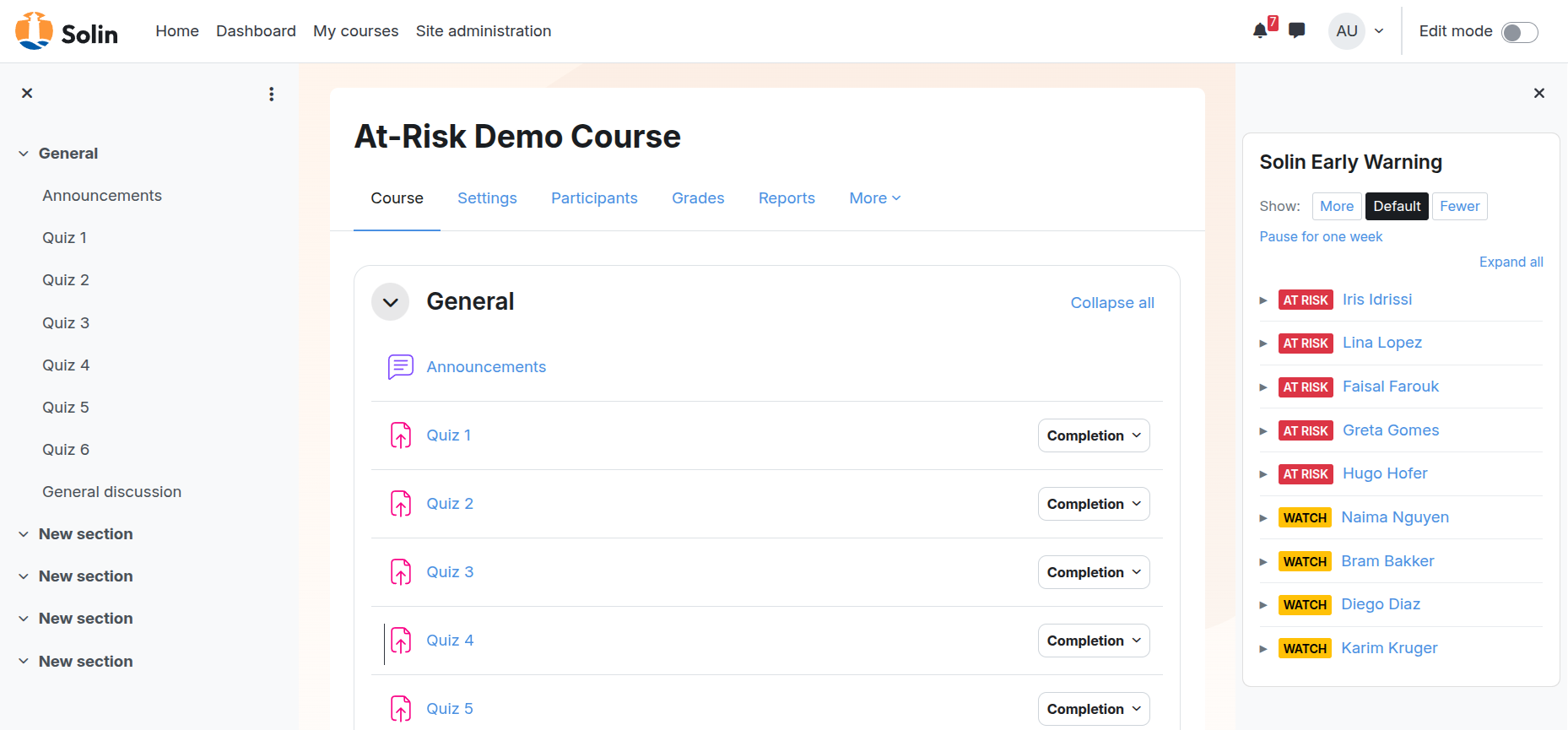
This guide explains how the heuristics work, the research behind them, and how you can tune the settings for your own courses.
Prefer to watch? Here is a short walkthrough of the block in action:
Before you start: Completion tracking
Before the block can use all of its signals, your course needs activity completion tracking enabled. Two signals depend on this: assessment miss and stalled completion.
For the assessment-miss signal to work, the relevant activities also need an “Expect completed on” date configured. If completion tracking is not enabled in your course, the block will still run using inactivity, grade trend, and optional forum silence, but it cannot tell whether students are missing expected activity completions.
The research: Architecture over magic numbers
The most authoritative public guidance on early warning systems (such as the 2018 NCES Forum Guide) explicitly states that universal “default” thresholds do not exist. What counts as at-risk in a short compliance module is very different from a 14-week university semester.
For this reason, Solin Early Warning provides a research-informed architecture with institution-tunable thresholds. The combination of signals is backed by empirical literature, but the exact numbers are conservative starting points that you are expected to tune.
To make this distinction visible, every default in the next section is labeled with its evidence type:
- Strong empirical: the signal or threshold is directly supported by published studies.
- Institutional convention: the most common starting value across documented practitioner sources, but not directly empirically validated.
- Conservative starting point: a reasonable default that you should expect to tune for your context.
- Contested: the empirical literature disagrees about whether the signal predicts what we think it predicts.
How the 5 signals work
The block evaluates students against five independent signals. If a student triggers any of these signals, they appear in the block.
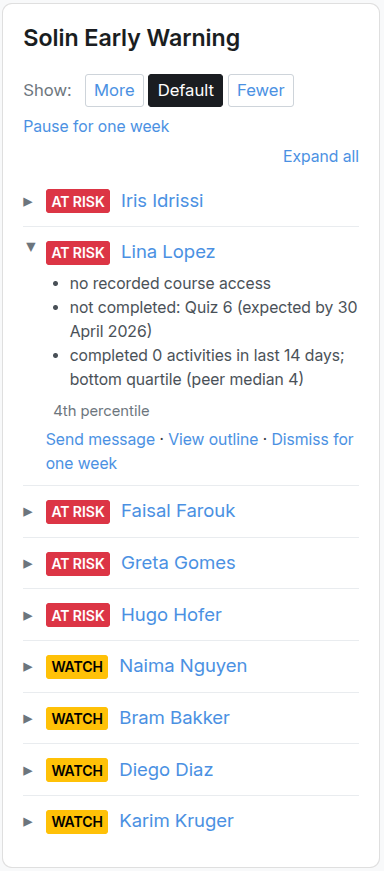
1. Inactivity (Default: 7 days)
- How it works: Flags a student if they have not accessed the course in the last 7 days.
- The research: The signal itself is well supported (course access is a basic engagement indicator across the literature). The 7-day threshold is institutional convention: a 7 to 15-day window is the most common starting value in higher-education practitioner sources.
- Configuration advice: For short, fast-paced courses, tighten this to 3 or 5 days. For long-cadence or self-paced courses, widen it to 14 days or more.
2. Assessment miss (Default: 14-day window)
- How it works: Flags a student who has not completed an activity whose expected completion date fell within the last 14 days. This applies to assignments, quizzes, SCORM packages, lessons, H5P activities, graded forums, and any other Moodle activity that uses completion tracking.
- The research: Strong empirical support for the signal itself. Open University (OU Analyse) research shows that students who miss the first Tutor Marked Assignment have a very high probability of course failure; LAK 2025 confirms missed-deadline behavior as a strong predictor across more than 50,000 assignments. The 14-day window is a conservative starting point and is not itself empirically optimized.
- Caveat: The signal uses the activity-level expected completion date. It does not yet account for per-student extensions (such as quiz access overrides or assignment user-flag extensions). A student given an extra week on Quiz 3 will still be flagged as “not completed” while their override is active.
3. Negative grade trend (Default: Enabled)
- How it works: Flags a student whose course total grade has trended downward for two consecutive weeks. This signal only becomes available after the block has collected enough weekly grade snapshots.
- The research: The broader literature supports academic performance and negative momentum as useful risk indicators, but the empirical evidence does not validate any specific delta or interval. We deliberately do not require a percentage drop. The “two consecutive weeks” rule is a conservative starting point.
4. Stalled completion vs peers (Default: Bottom quartile in 14 days)
- How it works: Flags a student who is in the bottom 25% of the class for completing activities over the last two weeks.
- The research: The Purdue Course Signals project made peer-relative activity a central part of its early-warning model, and the JISC case study identified it as a key differentiator from absolute-threshold systems. The idea is simple: a student’s activity level is easier to interpret when compared to the actual pace of the class. The specific “bottom quartile in 14 days” rule is a conservative starting point.
5. Forum/discussion silence (Default: Disabled / Opt-in)
- How it works: Flags a student with zero forum posts in the last 14 days, provided the rest of the class is actively posting.
- The research: Contested. Some studies find forum participation significantly predictive; Rogers et al. (2025) find a weak negative correlation with academic performance. Vendor systems like Brightspace treat it as a core indicator, but that assumes forums are structurally central to the course pedagogy.
- Configuration advice: Because of the contested evidence, this signal ships disabled. A site administrator can enable it under Site Administration → Plugins → Blocks → Solin Early Warning. Once enabled site-wide, individual teachers can override it per course (force on, force off, or inherit the site default) via the block’s gear icon. Only enable it if discussion forums are central to your course pedagogy.
How configuration works
Solin Early Warning has three layers of configuration, in order of reach:
- Site-level defaults. Set by a site administrator under Site Administration → Plugins → Blocks → Solin Early Warning. These are the institution-wide defaults every block instance starts from.
- Per-block-instance overrides. A teacher with the right capability can override site defaults for a specific course by clicking the gear icon on the block. The configuration form is explicit about what is overridden and what is inherited (it shows “Inheriting site default: 7 days” rather than just “7 days” so it is obvious when an institution-wide change will affect this course).
- Inline sensitivity preset. The “Show: More / Default / Fewer” dropdown on the block header. This is the fastest way to recalibrate without leaving the course. It writes to the per-block-instance configuration, so a teacher’s preset persists across visits.
Most teachers will only ever use layer 3. Most administrators will only ever set layer 1.
Context matters: Percentiles, small classes, and calibration
Raw data is useless without context. The block includes specific features to make sure the flags make sense in the real world.
Peer-percentile rank and small classes
Next to every flag, the block shows the student’s percentile rank compared to their peers. If a student has not logged in for 9 days, the block will also tell you if that puts them in the bottom 10% of the class.
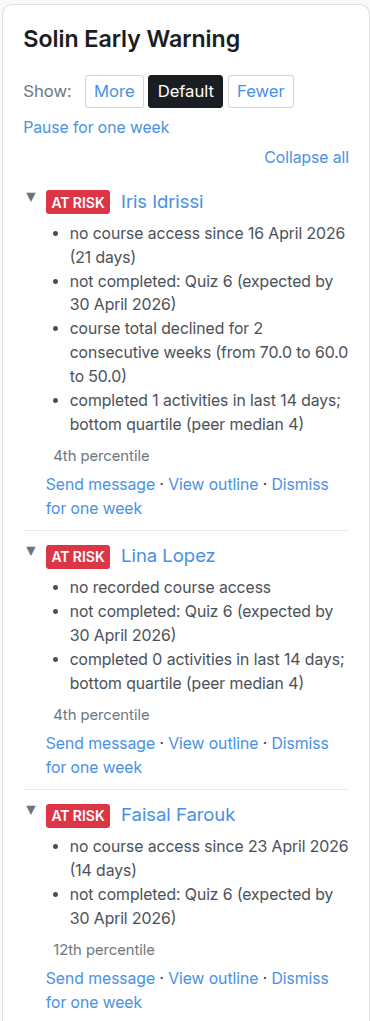
However, peer-relative signals need a meaningful peer group. In very small courses (fewer than 10 active enrollments), the block will automatically disable peer-relative signals because a single student can distort the comparison. In classes between 10 and 19 students, the block will show a caveat advising you to interpret the peer comparison with care.
The 4-week calibration window
Empirical studies repeatedly show that the first 3 to 5 weeks of a course are the highest-signal window for predicting dropouts.
- Weeks 1 and 2: The block only flags students who have not accessed the course at all yet. Other signals are still gathering data.
- Weeks 3 and 4: All enabled signals run, but flagged students are marked with a “Tentative” badge. This allows teachers to see the heuristics calibrating during the period when early intervention matters most.
- Week 5 onward: The tentative badge is removed and the block runs with full confidence.
If you install the block on a course with no enrolled students, the block will say “Heuristics will activate when students enroll”. This is expected behavior, not a bug.
Holidays and term breaks
Time-based signals would otherwise produce a flood of false positives during institutional breaks: every student looks “inactive” during winter break, and any activity scheduled across the break window appears “missed”. The block handles this in three ways:
- Site-level breaks calendar. A site administrator can declare institution-wide break ranges (Christmas, spring break, summer holidays) under the block’s site settings. Time inside those ranges is discounted in time-based calculations, so a holiday does not make students look inactive simply because the course was paused. Activities whose expected completion date falls inside a break are excluded from the assessment-miss signal.
- Per-course break ranges. A teacher can declare ad-hoc break ranges for a specific course via the block’s gear icon. These add to the site-level list. Use this for course-specific pauses that do not apply institution-wide.
- Pause for one week. A “Pause for one week” link in the block header is available to teachers and adds a one-week break to the current course. A “Resume now” link appears in the active-break banner if you need to end the pause early.
When the current render time falls inside a configured break, the block shows a banner explaining that the list reflects pre-break activity. When past breaks are dampening the current numbers, the block shows a small note explaining how many days of break time were excluded. The flagged list is never hidden during a break — it stays visible so a teacher preparing for resumption can see what is queued up.
Day-to-day use for teachers
The block is designed to be scannable and actionable within seconds.
- Reading severity: A student who triggers exactly one signal gets a Yellow “Watch” label. A student triggering two or more signals gets a Red “At risk” label. The list automatically sorts the most severe cases to the top.
- Adjusting sensitivity: Teachers will not use a tool that floods them with noise. In the block header, there is a “Show: More / Default / Fewer” dropdown. This allows you to instantly recalibrate the block for your course without opening the settings form. “More” adjusts the thresholds in the direction that shows more students. “Fewer” only shows the clearest cases.
| Setting | More (shows more students) | Default | Fewer (shows fewer students) |
|---|---|---|---|
| Inactivity | 5 days | 7 days | 14 days |
| Assessment-miss lookback | 21 days | 14 days | 10 days |
| Forum-silence lookback | 10 days | 14 days | 21 days |
| Grade trend | unchanged | unchanged | unchanged |
| Stalled completion | unchanged | unchanged | unchanged |
- The release valve (Dismiss for one week): If a student is flagged but you know the situation is already explained (for example: illness, a planned absence, or a temporary extension), you can click “Dismiss for one week”. The student is hidden from the list for 7 days. After that, they will reappear only if they still trigger one or more signals.
What about Moodle’s built-in analytics?
Moodle includes a Learning Analytics tool with a “students at risk” model. It is a different design choice: it uses a machine-learning backend (the PHP backend mlbackend_php ships bundled and is the default, with an optional Python backend mlbackend_python for larger sites) to predict dropout probability, and surfaces insights through Moodle’s messaging system, including email. It can suit institutions that are prepared to maintain the required analytics setup and that prefer push notifications.
Solin Early Warning takes a different approach: in-course visibility, transparent heuristics rather than ML, no email blasts, and an explicit per-signal explanation for every flag. Both can run on the same site. They answer different questions.
What this block does not do
Solin Early Warning does not predict dropout probability, and it does not replace teacher judgment. It does not use demographic profiling, student-background data, or a machine-learning model. It only uses observable Moodle course data and shows the reason for each flag.
A flag means: this student is worth checking. It does not mean: this student will definitely drop out.
Research behind this guide
The signal design and initial configuration defaults of the Solin Early Warning block are informed by the following sources:
- National Forum on Education Statistics (NCES), Forum Guide to Early Warning Systems (2018)
- Kuzilek et al., Open University Learning Analytics Dataset (Scientific Data, 2017); see also the OU Analyse project
- Arnold & Pistilli, Course Signals at Purdue: Using Learning Analytics to Increase Student Success (LAK 2012)
- JISC, Traffic lights and interventions: Signals at Purdue University (case study, 2016)
- Sanchez et al., Predictive analytics study to determine undergraduate students at risk of dropout (Frontiers in Education, 2023)
- Lazar et al., Will they or won’t they make it in time? The role of contextual and behavioral predictors in reaching deadlines of mandatory assignments (LAK 2025)
- Rogers et al., Moodle interactions and academic performance: educational data mining in a Philippine university (Journal of Education and Learning, 2025)
Next steps
Solin Early Warning is designed to make risk signals visible inside Moodle. For institutions that want a broader view across courses, Solin can also help review engagement patterns and tune the thresholds to the shape of your courses.
You can install the plugin from the Moodle plugin directory, download it from GitHub, or learn more at solin.co/early-warning.
Solin offers Moodle plugins and analytics that make student engagement visible where teachers actually work.
Contact us