


Solin Early Warning block (block_atrisk)
This page is the canonical documentation for the free block_atrisk Moodle™ plugin. It is referenced from the plugin’s Moodle Plugins Directory entry and from the GitHub repository. For the product overview (free block + commercial Dashboard + expert services) see the Solin Early Warning product page.
The block surfaces, in a teacher’s course view, a ranked list of students at risk of disengagement. It uses multi-signal heuristics over data Moodle™ already collects. There is no machine-learning backend, no email blast, no analytics-tool dependency, and no data leaves your Moodle™ instance.
Compatibility
| Moodle™ | PHP | Database | Branch |
|---|---|---|---|
| 5.2 | 8.3+ | PostgreSQL, MySQL 8, MariaDB | main |
| 5.1 | 8.2+ | PostgreSQL, MySQL 8, MariaDB | MOODLE_501_STABLE |
| 4.5 LTS | 8.1+ | PostgreSQL, MySQL 8, MariaDB | MOODLE_405_STABLE |
Moodle™ 5.0 is not supported (general-bug-fix EOL October 2026; widely skipped in upgrade paths from 4.5 LTS straight to 5.1+). Moodle Workplace is not officially supported in v1.
Installation
Pick the branch or release ZIP that matches your Moodle™ version:
| Moodle™ | Tag pattern |
|---|---|
| 5.2 | v{X.Y.Z}-MOODLE_502_STABLE |
| 5.1 | v{X.Y.Z}-MOODLE_501_STABLE |
| 4.5 LTS | v{X.Y.Z}-MOODLE_405_STABLE |
Via the Moodle™ admin UI
Download the ZIP for your Moodle™ version from the releases page, then go to Site administration → Plugins → Install plugins, drop in the ZIP, and confirm.
Via git
Clone the matching branch directly into the webroot:
cd /path/to/moodle/blocks
git clone -b MOODLE_502_STABLE https://github.com/solin-repo/moodle-block_atrisk.git atrisk
For Moodle™ 4.5 LTS use MOODLE_405_STABLE; for 5.1 use MOODLE_501_STABLE. The directory name on disk must be atrisk, not moodle-block_atrisk.
Then visit Site administration → Notifications, or run php admin/cli/upgrade.php, to install the plugin and create its tables. Once installed, turn editing on inside any course and add the Solin Early Warning block from the block picker.
What teachers see
The block sits in the course-view sidebar, visible only to users with the view capability (default: editing teachers, non-editing teachers, managers). Students never see it.
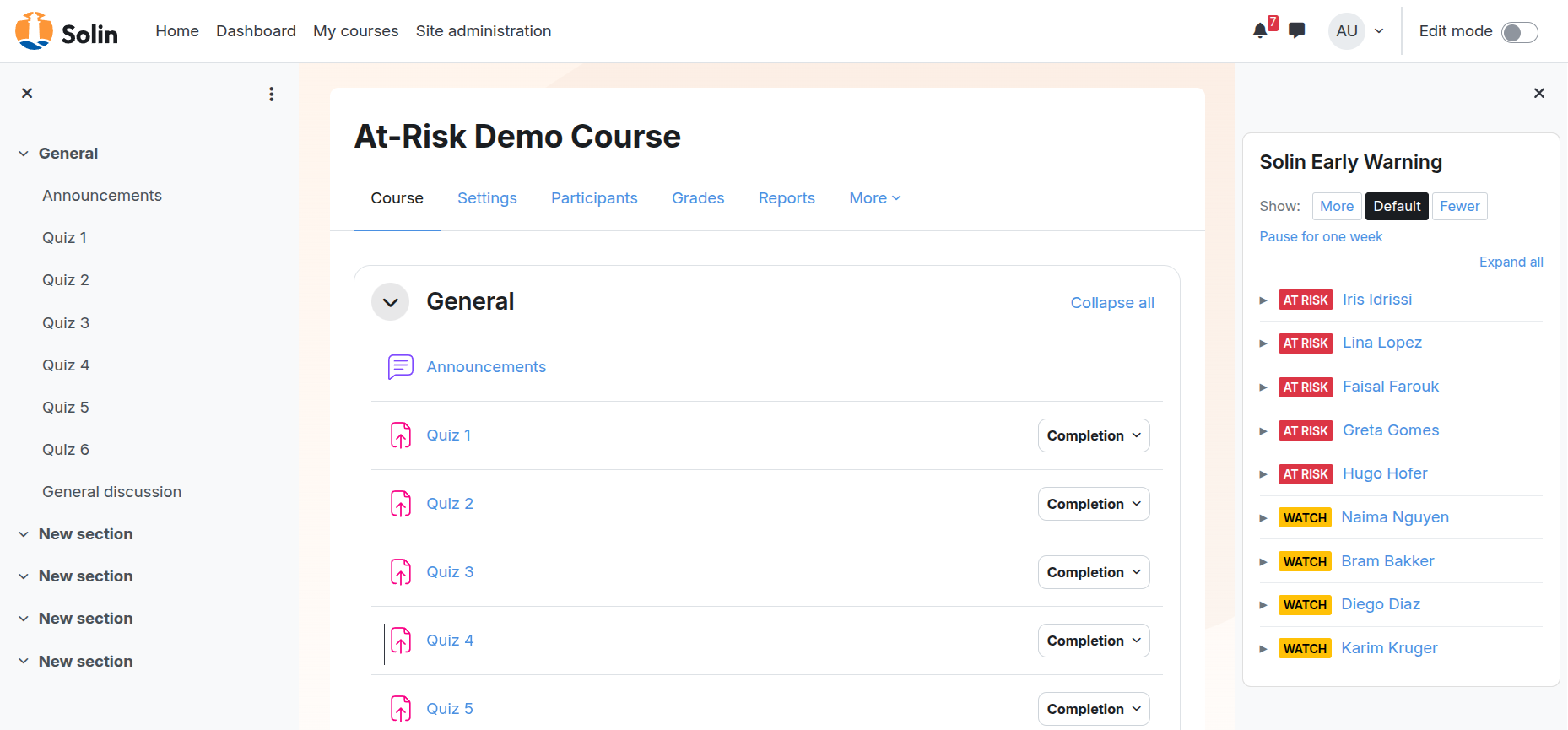
By default each row is collapsed, showing severity, name, and the optional Tentative badge during the calibration window. Click a row, or use the Expand all toggle, to see the per-signal reasons, the worst peer-percentile, and the action links.
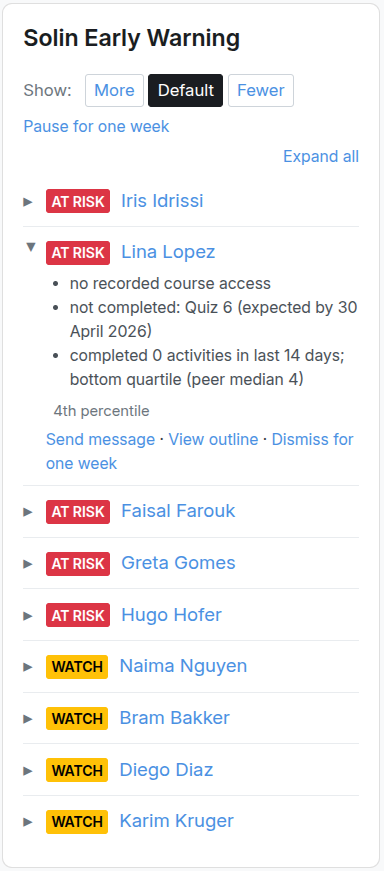
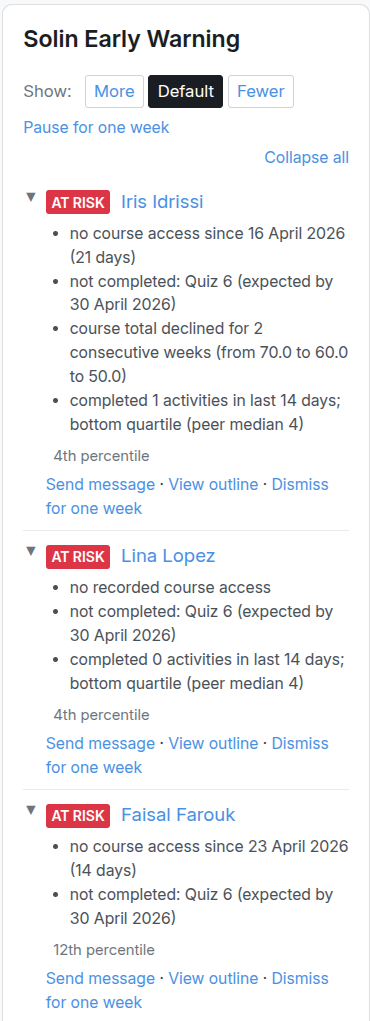
Action links
Each expanded row offers up to three actions, plus a block-wide pause control in the header.
Send message. Opens Moodle™’s standard messaging UI with the student pre-selected (/message/index.php?id={userid}). Requires the block/atrisk:messagestudent capability and the platform’s standard messaging capabilities on the target user.
View outline. Links to the per-student course outline at /course/user.php?id={courseid}&user={userid}, which lists the student’s recent activity, completion state, and grade entries inside the course. Useful as a one-click drill-down before intervening.
Dismiss for one week. Hides the flag from the list for 7 days. Stored as a row in block_atrisk_dismissals keyed on (courseid, userid) and applied across every block instance in the course (so dismissing in one block instance also clears it from another instance in the same course). The dismissal also captures the signals firing at click time (signals_at_dismissal JSON: signals, severity, preset) for end-of-term false-positive analysis. Requires block/atrisk:dismissflag.
Pause for one week (block header, users with block/atrisk:configureblock). Appends today, today+6d to the per-instance breaks list, suppressing the entire block until the range expires. The header link toggles to Resume now while the range is active. See Holidays and term breaks below.
Signals
Each signal evaluates one observable behavior and either fires or does not for a given student.
| Signal | Fires when | Default scope |
|---|---|---|
| Inactivity | Days since the student’s last access to this course exceeds the threshold. Site-level access does not count. | 7 days |
| Assessment-miss | A completion-tracked activity whose completionexpected date fell within the lookback is still INCOMPLETE for the student. | 14-day window |
| Negative grade-trend | The student’s weekly course-total grade has declined for two consecutive weeks. Requires three weekly snapshots. | Always on once snapshots accumulate |
| Stalled completion | The student’s count of completed activities in the lookback sits in the bottom quartile of their peer group (the actively-enrolled students in the same course). | 14 days |
| Forum silence (opt-in) | The student has zero forum posts in the lookback while the class median is at least one. | 14 days; disabled by default |
The forum-silence default is set under Site administration → Plugins → Blocks → Solin Early Warning. Individual block instances can override the default (Inherit / Force on / Force off).
Severity tiers
Yellow (“Watch”): exactly one signal fired. Red (“At risk”): two or more signals fired. A student with zero firing signals does not appear in the list.
List order
The block ranks the most-at-risk student first. Tiebreakers, in priority: severity (red before yellow); number of signals firing (more is worse); worst peer-percentile (lower percentile = more at risk relative to peers in the same course; the percentile direction is normalized per signal so “5th percentile” always reads as “worse than 95% of peers” regardless of whether the underlying metric is high-is-bad or low-is-bad); lastname / firstname, only for fully-tied rows.
The list cuts off at the top-N (site default 12, overridable per block instance). Remaining flagged students sit behind a “View all” link.
Calibration window
Signals do not fire blindly on a brand-new course. The output you see evolves over the first month of activity:
| Course week | Phase | What you see |
|---|---|---|
| 1–2 | Gated | Only the no-course-access-at-all-yet form of inactivity fires. The block shows the calibrating banner: “Heuristics are calibrating. Full signals activate from week 3.” |
| 3–4 | Tentative | All enabled signals run. Each flagged row is marked with a small Tentative badge alongside the severity color, signaling that the signal histories are still short and the flags should be weighted accordingly. |
| 5+ | Confident | No badge. Signals are at full strength. |
Course-week count is reckoned from course.startdate. For courses with no start date or with rolling enrolment, the per-student timeline is reckoned from mdl_user_enrolments.timestart (the user’s enrolment activation), falling back to timecreated. The window length is configurable site-wide (default 2 weeks gated, 2 weeks tentative).
The block also auto-disables peer-relative signals when the course has fewer than 10 active enrolments (hard floor) and warns when the count is between 10 and 19 (soft floor). “Active enrolment” means students with an active, non-suspended course enrolment, unrelated to the Moodle™ cohort entity (mdl_cohort / Site administration → Users → Cohorts), which this block does not use.
Groups
The block respects Moodle™’s group mode. Under No groups or Visible groups, every teacher with the view capability sees the full list. Under Separate groups with the viewer holding Access all groups, the same applies: managers and similarly-privileged teachers see everyone. Under Separate groups without that capability, the rendered list is filtered to students in the viewer’s own groups; if the viewer is in zero groups in this course, the block shows a distinct empty state.
Statistics scope is independent of the visibility filter. By default, peer-relative signals and the displayed percentile are computed against all course participants. A per-instance override (Show more… on the block edit form) lets a teacher confine peer baselines to the viewer’s groups, useful in courses where groups are structurally separate (different teachers, different paces).
Holidays and term breaks
Break periods are subtracted from the engine’s calculations. During a break the block shows a paused banner; after a break, the engine dampens metrics so students are not flagged for inactivity or missed work that happened over a holiday.
Site-wide calendar
Set once for the institution under Site administration → Plugins → Blocks → Solin Early Warning → Breaks calendar. Format: one break per line, ISO dates, YYYY-MM-DD, YYYY-MM-DD. Lines starting with # are comments.
# 2026/2027 academic year
2026-10-13, 2026-10-19
2026-12-22, 2027-01-04
2027-02-23, 2027-03-01
2027-04-27, 2027-05-08
2027-07-13, 2027-08-23
Course-specific breaks
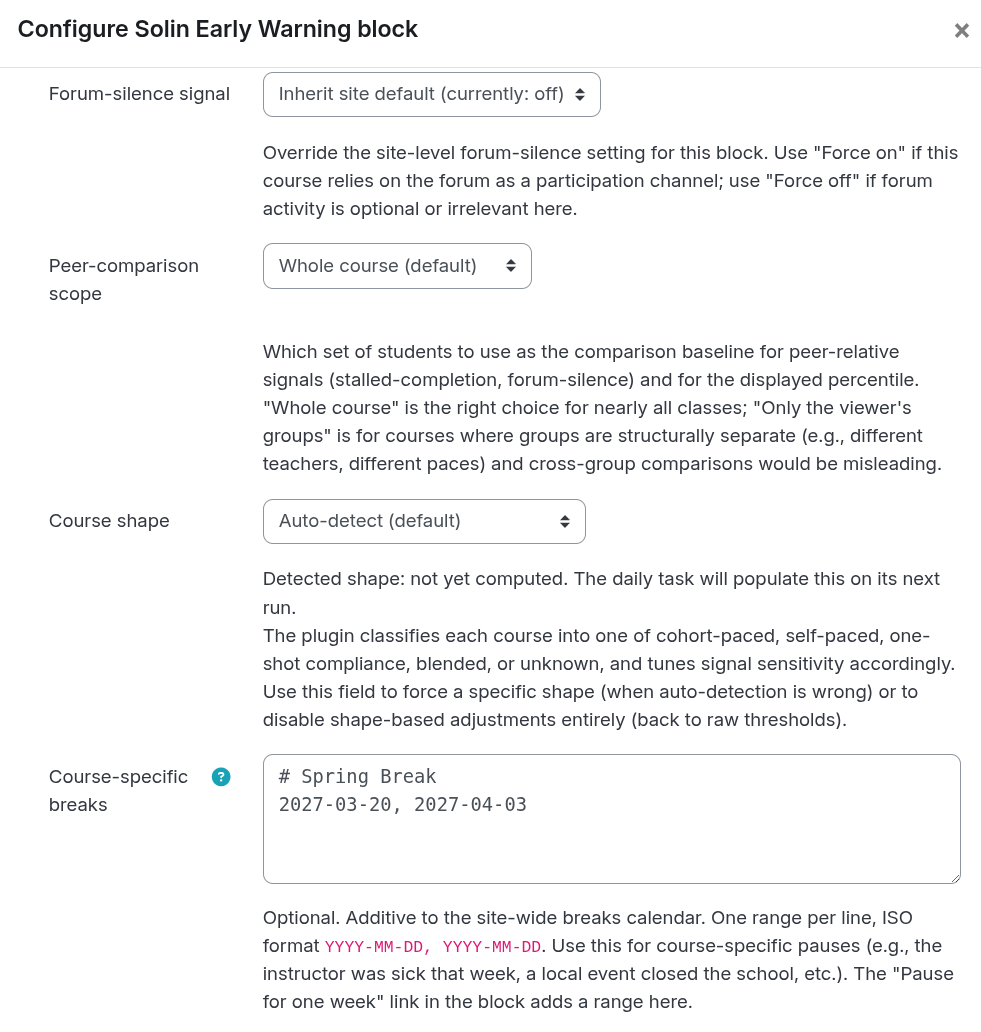
Each block instance has its own optional course_breaks field, additive to the site calendar. Format is the same. Use it for ad-hoc pauses that do not apply institution-wide.
While a break is active
The block shows an informational banner above the list: “Currently in a configured break (until 7 January 2027). The list reflects pre-break activity; break time is excluded from the calculations.” The list itself stays visible so a teacher preparing for resumption can see pre-break flags.
After a break
The engine subtracts the break’s overlap from each signal’s lookback. Inactivity does not count idle time spent on holiday: a student last seen the day before Christmas, returning January 8, is not flagged at the default 7-day threshold. Forum-silence and stalled-completion lookbacks are extended backward by the break duration so the window reaches pre-break activity. Assessment-miss does the same and additionally suppresses activities whose completionexpected falls inside a break. Grade-trend is naturally self-correcting: break-week snapshots have no change to compare against.
A small note appears above the list (“Break dampening: 14 days of recent break time excluded”) whenever past breaks are affecting the current render.
Quick pause and resume
For users with configureblock, an inline Pause for one week link in the block header appends today, today+6d to the per-instance break list. Resume now in the active-break banner removes any per-instance range that currently includes “now”; site-level ranges keep applying. Both links carry tooltips describing the action and its scope.
Retroactive entry: entering past dates in either calendar dampens the next render’s metrics, so a teacher returning from a forgotten pause can fix the false-positive flood in one form save.
Configuration
Site-wide settings
Site administration → Plugins → Blocks → Solin Early Warning.
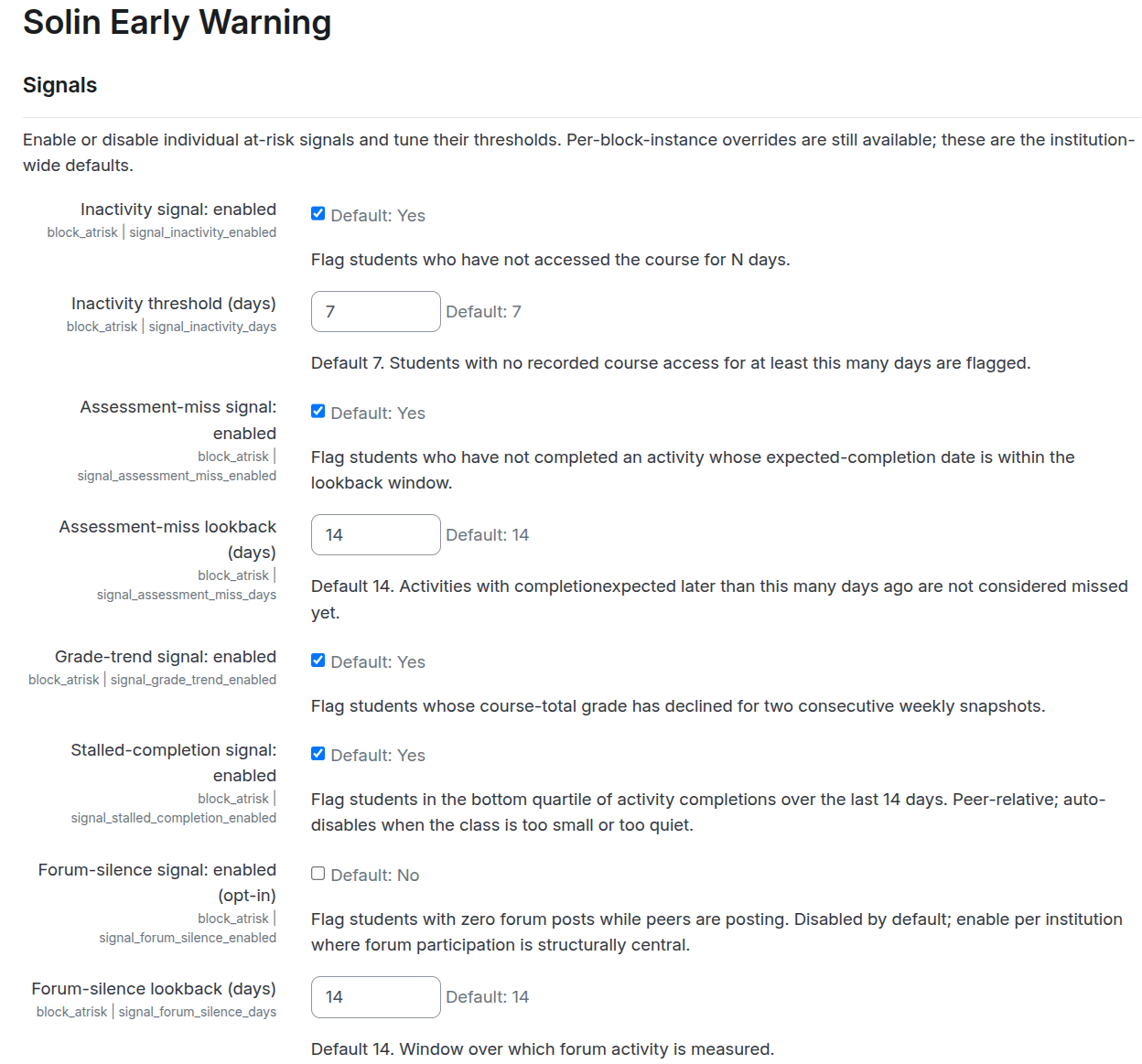
The page is grouped into sections.
Per-signal enable / threshold. Turn each signal on or off and set its default threshold (inactivity days, assessment-miss lookback, forum-silence lookback). The grade-trend and stalled-completion signals have no numeric threshold; they fire on consecutive-decline and bottom-quartile respectively.
Cohort floors. The hard floor (default 10) and soft floor (default 20) for active enrolments, controlling when peer-relative signals auto-disable or carry the small-class caveat.
Calibration window. The gated and tentative phase lengths (default 2 + 2 weeks).
Sensitivity preset visibility. Show or hide the per-block Show: More / Default / Fewer control. Hide it to enforce institution-wide thresholds; show it to let teachers tune per course.
Display top-N. The default visible row count in the block (default 12). Per-block override available.
Breaks calendar. Site-wide holiday list (see Holidays and term breaks).
Retention. dismissal_log_retention_days (default 365), flag_log_retention_days (default 365). Grade-snapshot retention is hard-coded at 12 ISO weeks.
Recalibration data. Opt-in flag_logging_enabled toggle for the weekly per-signal flag log used in recalibration analysis. Off by default.
Per-instance settings
Each placed block carries its own configuration form (Configure Solin Early Warning block). Settings are organized so the most common one is visible immediately and advanced overrides sit behind Show more….
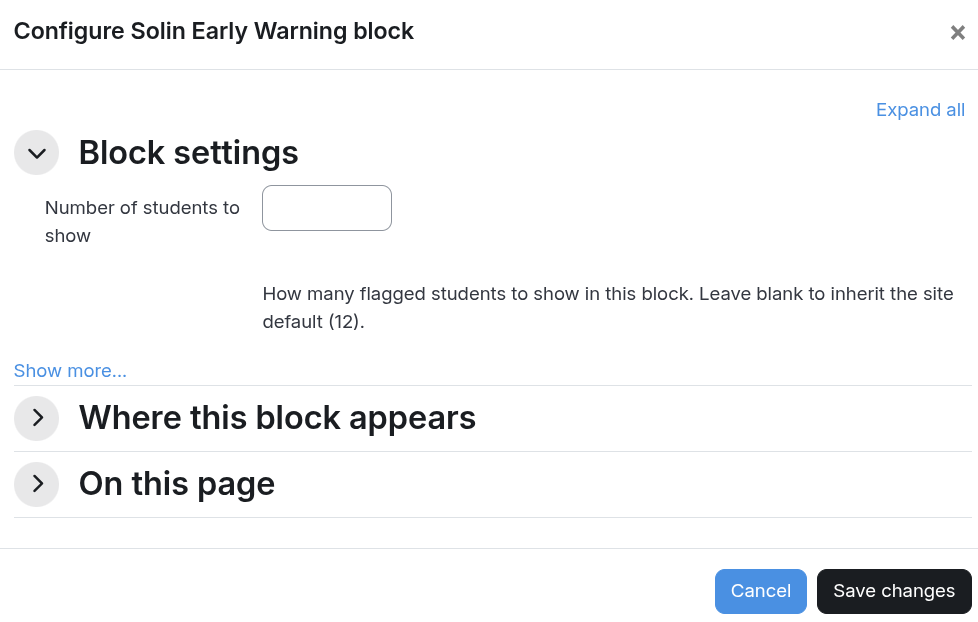
Number of students to show. Overrides the site-wide top-N for this course only. Leave blank to inherit.
Forum-silence signal (advanced). Inherit site default / Force on / Force off. Use Force on in courses that rely on forum participation, Force off in courses where forums are structurally absent or optional.
Peer-comparison scope (advanced). Whole course (default) / Only viewer’s groups. Confine peer baselines to the viewer’s groups in courses where groups are structurally separate.
Course shape (advanced). Auto-detected from course-shape signals; can be overridden to one of cohort_with_dates, self_paced, blended, one_shot_compliance, unknown. Affects the engine’s per-shape adjustments to inactivity and other lookbacks.
Course-specific breaks (advanced). Additive to the site-wide breaks calendar (see Holidays and term breaks).
Sensitivity control: Show More / Default / Fewer
A per-block control widens or narrows the criteria. Site administrators can hide the control to enforce institution-wide thresholds; otherwise teachers can tune per course.
| Preset | Inactivity | Assessment-miss | Forum-silence |
|---|---|---|---|
| More (more flags) | ≥ 5 days idle | ≤ 21-day window | ≥ 10 days silent |
| Default | site default (7 days) | site default (14 days) | site default (14 days) |
| Fewer (fewer flags) | ≥ 14 days idle | ≤ 10-day window | ≥ 21 days silent |
The direction matches the preset name on every signal: a wider inactivity threshold (5 days) is easier to qualify for, and a longer assessment-miss lookback covers more eligible activities and therefore catches more potential misses, so both push toward more flags under “More.” Grade-trend and stalled-completion are unaffected by the preset (their thresholds are structural, not numeric).
Signal requirements
The block runs without course-level activity completion tracking, but two of the five signals depend on it. Assessment-miss and stalled-completion require Course settings → Completion tracking → Enable completion tracking set to Yes. Assessment-miss additionally requires the activities it should cover to have completion configured AND completionexpected set. Inactivity, grade-trend, and forum-silence run regardless.
When completion is off, the block renders a banner explaining which signals are unavailable; the others continue to flag students.
Limitations
Activity-type coverage. Assessment-miss works against any activity type that supports the Moodle™ completion API: assign, quiz, scorm, lesson, h5pactivity, graded forum, data, workshop, third-party modules using core completion. It does not detect engagement quality within an activity, only whether the student met the configured completion criteria by the expected date.
Per-student activity overrides. The assessment-miss signal uses the activity-level completionexpected timestamp. It does not account for per-student module overrides such as quiz access extensions in quiz_overrides or assignment user-flag extensions in assign_user_flags. A student given an extra week on Quiz 3 will still be flagged as not completed while their override is active.
Inactivity is binary access, not engagement quality. A student who logs in for 30 seconds counts the same as one who works for two hours. The stalled-completion signal partially compensates by measuring completed activities.
Grade-trend needs three weekly snapshots. Brand-new courses, courses where grading has not started, and students enrolled mid-week all delay the signal until the third weekly snapshot has been written.
Frequently asked questions
Why is no one flagged in my new course?
The calibration window. During weeks 1–2 only the strictest form of inactivity (no course access at all yet) fires. From week 3 every signal runs, with a Tentative badge until week 5. See Calibration window above.
A student is flagged but has a documented absence.
Click Dismiss for one week on their row. The dismissal hides the flag for 7 days across every block instance in the course.
Going on holiday next week. How do I avoid a flood of false positives on return?
Use the Pause for one week link in the block header for a quick pause, or for an institution-wide pause add the date range to the Site administration → Breaks calendar. Both retroactively dampen the metrics, so even adding the range after the break fixes the next render in one form save.
Can students see this block?
No. Visibility is gated on block/atrisk:viewflags, which is granted by default to editing teachers, non-editing teachers, and managers only. The block also restricts itself to course-view contexts and will not appear on the dashboard.
Does this plugin send any data to Solin or third parties?
No. All processing happens inside your Moodle™ instance. No external APIs, no analytics, no telemetry. The optional Readiness data export is downloaded by an admin and never transmitted.
Why is the count in the block different from the count behind “View all”?
The block shows the top-N most-at-risk students (default 12). “View all” paginates the entire flagged list. Counts will differ when more than N students are flagged.
Can I run this without enabling completion tracking?
Yes, but assessment-miss and stalled-completion will not fire; those two signals depend on completion data. Inactivity, grade-trend, and forum-silence work either way. The block surfaces a banner pointing to Course settings → Completion tracking when completion is off.
Will the heuristics be auto-tuned over time?
Not in this release. The plugin captures the data needed for manual recalibration (dismissal records and the opt-in weekly flag log), and ships starter SQL queries for the analysis (see the README). Future releases may add an admin UI on top of those queries.
Scheduled tasks
The plugin runs four cron-driven tasks. Institutions running cron less often than weekly will see the grade-trend signal lag accordingly.
| Task | Schedule | Purpose |
|---|---|---|
\block_atrisk\task\prune_dismissals | daily | Removes dismissal rows past the configured retention window (default 365 days after dismissed_until). |
\block_atrisk\task\snapshot_grades | weekly (Sunday 02:00) | Writes one course-total grade snapshot per active student in any course where the block is instantiated. |
\block_atrisk\task\snapshot_flags | weekly (Sunday 02:30) | Opt-in. Writes one row per (course, student, signal) for every currently-flagged student. Disabled until the admin sets flag_logging_enabled under the site settings. Used for end-of-term recalibration analysis. |
\block_atrisk\task\prune_flag_snapshots | daily | Drops flag-snapshot rows past the configured retention window (default 365 days). |
Personal data and GDPR
Your Moodle™ instance is the data controller; this plugin acts as processor on its behalf. The notes below cover the personal-data implications so the institutional data-protection officer (or equivalent) can make informed decisions and update the privacy notice.
Always-on processing
Reads course access timestamps, completion records, gradebook entries, forum posts, group membership, enrolments, and role assignments. Processing happens at render time and the data is not stored. Lawful basis: typically legitimate interest (Art. 6(1)(f in supporting student outcomes, or contract performance with the student (Art. 6(1)(b where applicable.
Stored personal data (always)
block_atrisk_dismissals stores teacher dismissals of student flags, including a signals_at_dismissal JSON column (signals firing, severity, preset) used for false-positive analysis. Default retention 365 days past expiry, configurable.
block_atrisk_grade_snapshots stores weekly course-total grade snapshots, source data for the grade-trend signal. Retention 12 ISO weeks (hard-coded; only what the signal needs).
Stored personal data (opt-in only)
block_atrisk_flag_snapshots is a weekly per-signal log of which students were flagged and why. Disabled by default; an admin enables it under Site administration → Plugins → Blocks → Solin Early Warning → Recalibration data → Log weekly flag snapshots. Default retention 365 days, configurable.
Retention
| Table | Default retention | Setting |
|---|---|---|
block_atrisk_dismissals (incl. signals JSON) | 365 days post-expiry | dismissal_log_retention_days |
block_atrisk_grade_snapshots | 12 ISO weeks | hard-coded (signal-driven) |
block_atrisk_flag_snapshots (opt-in) | 365 days | flag_log_retention_days |
Set the configurable values lower if institutional policy requires shorter retention.
Data subject rights (Arts. 15–22)
All implemented via Moodle™’s standard Privacy API. Access (Art. 15) and portability (Art. 20): the privacy provider exports per-user rows from all three tables. Erasure (Art. 17): per-user deletion drops the user’s rows. For dismissal records where the user was the acting teacher, the dismissed_by column is anonymized to 0 instead of dropping the row, so the affected student’s record is preserved. Object (Art. 21): the institution disables the opt-in flag log globally; existing rows are removed at the next prune cycle. Per-user objection is honored via Art. 17 erasure.
Sample privacy-notice text
“We use a Moodle™ plugin (Solin Early Warning) that combines objective signals such as course access, activity completion, grade trend, completion rate, and optional forum participation to flag students who may need additional support. Teachers see the flagged list when they open the course. The plugin does not predict outcomes or use machine learning. Data is processed within our Moodle™ instance and is not shared externally. We retain teacher-dismissal records and (where enabled) weekly per-signal flag-state for up to one academic year so we can verify and improve the detection’s accuracy. You may request access, correction, or deletion of your records at any time via [contact].”
Adapt to your locale, controller name, and chosen lawful basis.
Data Protection Impact Assessment (Art. 35)
A DPIA may be required when processing involves “systematic and extensive evaluation of personal aspects” or where data subjects are vulnerable (for example, minors). Educational profiling can fall in this category. The plugin uses transparent, threshold-based signals (not machine learning, not predictive scoring), and processing is bounded to a single Moodle™ instance, which lowers the risk profile. The ultimate DPIA call is the controller’s. Your DPO should review whether a DPIA is warranted given your context (especially if students are minors or the platform is used in a country/region with specific educational-data rules).
Capabilities
| Capability | Default roles |
|---|---|
block/atrisk:addinstance | editingteacher, manager |
block/atrisk:viewflags | editingteacher, teacher, manager |
block/atrisk:configureblock | editingteacher, manager |
block/atrisk:configuresite | manager |
block/atrisk:dismissflag | editingteacher, manager |
block/atrisk:messagestudent | editingteacher, manager |
How this compares to other options
If you are choosing between this plugin and other Moodle™ tools that flag struggling students:
| Tool | Type | Approach | Scope | Cost |
|---|---|---|---|---|
| Solin Early Warning (this plugin) | Course block | 5 heuristic signals, ranked list | One course | Free, GPL |
Moodle™ core analytics (tool_analytics) | Site tool | ML model (“Students at risk of dropping out”) | Site-wide reports | Bundled with Moodle™ |
block_completion_progress | Course block | Single-signal completion heatmap | One course | Free, GPL |
block_studentperformancepredictor | Course block | ML model trained on historical data | One course | Free, GPL |
| IntelliBoard / LearnerScript / Zoola Analytics | External SaaS connector | Cross-course reporting and analytics | External dashboard | Commercial, subscription |
Moodle™ core analytics ships with Moodle™ and includes a “Students at risk of dropping out” predictive model. Practical use requires either the limited PHP back-end or the full Python / MLBackend stack. Several institutions keep it disabled because of the operational cost. This plugin exists partly as a drop-in alternative that produces meaningful output from week 3 of any course without an analytics back-end.
block_completion_progress visualizes per-student completion as a per-course heatmap. Complementary, not a substitute. It uses one signal (completion ratio); this plugin combines five signals and produces a ranked top-N triage list.
block_studentperformancepredictor trains a machine-learning model on the institution’s historical course outcomes. Higher operational cost and longer time-to-value than a heuristic block; potentially more predictive once trained on enough data.
IntelliBoard, LearnerScript, Zoola Analytics and similar are commercial cross-course reporting suites. Strong on portfolio and institutional rollups; data leaves the Moodle™ instance for an external dashboard. They do not give a teacher an at-risk list inside the course they are teaching.
Where this plugin fits: free, self-hosted, no external dependencies, no data egress, no ML training. If you also need institution-wide rollups (flag counts across courses, category dashboards, audit reporting), see the commercial Solin Early Warning Dashboard.
Source, issues, and support
Source code: github.com/solin-repo/moodle-block_atrisk. Releases: github.com/solin-repo/moodle-block_atrisk/releases. Issue tracker: github.com/solin-repo/moodle-block_atrisk/issues. Plugin Directory entry: moodle.org/plugins/block_atrisk. License: GPL v3 or later.
Solin offers a paid Early Warning Dashboard plugin for institution-wide rollups, plus fixed-price configuration and calibration services. See the Solin Early Warning product page for the full product line.
For questions about deploying or tuning block_atrisk, please contact us.